Comparative Analysis

Increase Percentage Calculator: Calculate Growth, Price Changes & Salary Raises

Quick Answer & Key Takeaway (TL;DR)

Increase percentage calculator formula: Increase (%) = ((New Value - Original Value) ÷ Original Value) × 100. For instance, if your monthly rent increases from $1,200 to $1,350, the percentage increase is ((1350 - 1200) ÷ 1200) × 100 = (150 ÷ 1200) × 100 = 12.5%.

Whether analyzing month-over-month website analytics, evaluating a promotion offer, or budgeting for utility rate hikes, an increase percentage calculator clarifies exact numerical growth.

The Percentage Increase Equation
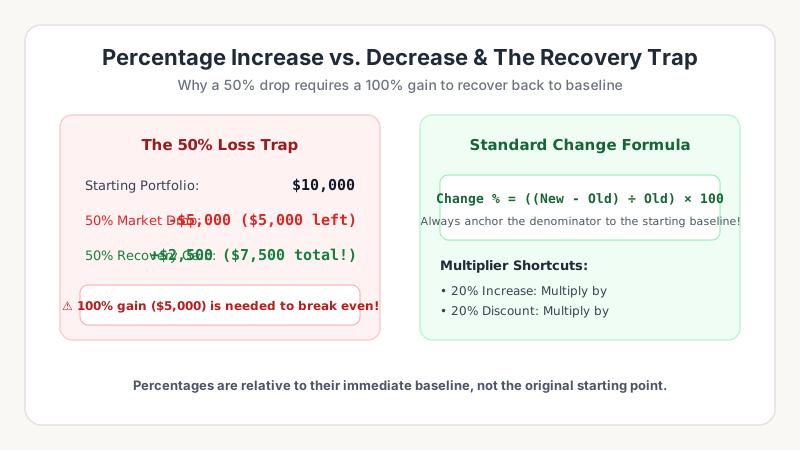
Calculating Growth and Raises
Tracking year-over-year growth, salary raises, and multiplier shortcuts.
Increase Percentage Formula
Increase (%) = ((Final Value - Initial Value) ÷ Initial Value) × 100

Always divide by the starting baseline number! If a KPI grows from 80 to 120: (120 - 80) ÷ 80 = 40 ÷ 80 = 0.50 × 100 = +50% increase.

Evaluate your growth metrics using our Percentage Change Tool.

Frequently Asked Questions

What is the formula to calculate percentage increase?
Percentage Increase = ((New Value - Old Value) ÷ Old Value) × 100.
How do you calculate a 10% increase on $300?
Multiply 300 by 1.10 to get $330.

Dr. Evelyn Reed

Quantitative Analyst & Mathematics Educator

Dr. Evelyn Reed holds a Ph.D. in Applied Mathematics and specializes in statistical analysis, financial numeracy, and computational precision systems.

Put These Formulas into Practice

Test any formula with custom numbers using our verified, in-browser mathematical calculators: